Webhooks
A webhook consists of a URL through which the server*, Cargamos in this case, can initiate communication with the client, and provide information as it becomes available and without requiring the client to request it on demand. Note that communications are typically initiated by the client. In this case, it's the server that initiates the communication.
- Client/Server in the context of this description refers to the Shipper/Cargamos pair, respectively.
The webhook system allows the shipper to receive “real-time“ notifications of state changes for each of the integrated shipments. These notifications are received independently, meaning that even if multiple orders are integrated (in batch), notifications are received individually for each active shipmentId/trackingId. Only one webhook can be registered per shipper.
In summary, the webhook system allows you to:
- Register a webhook (URL), belonging to the shipper, to which state changes of shipments. will be notified.
- Choose the states that are of interest to the shipper. For example, the shipper might only be interested in being notified of DELIVERED and MISHAP states. The first one to know that the package was successfully delivered, and the second one to be aware that there was a problem with the package and instructions are expected.
- Suspend the delivery of notifications via webhook.
To manage the webhook service, the Webhooks API is provided, which can be consulted in the API reference.
An example of a typical usage flow can be seen in the figure. In the first step, the webhook registration is performed, indicating the states of interest, DELIVERED and OUT_FOR_DELIVERY. Subsequently, a notification is received each time any of the shipments transition to the states of interest (i.e. DELIVERED and OUT_FOR_DELIVERY).
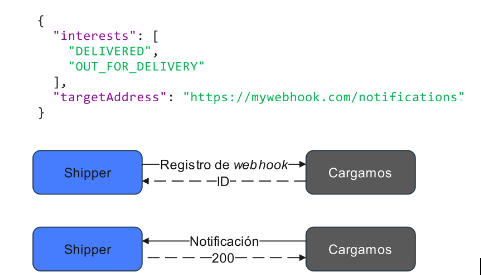
Fig. Webhook typical usage flow
Webhook example:
{
  "state": "DELIVERY_ATTEMPTED",
  "label_id": "CH00000000044",
  "anomalies": {
    "anomaly_type": "RECIPIENT_NOT_AT_ADDRESS",
    "description": null
  },
  "evidences": [
    {
      "type": "IMAGE",
      "name": "FACADE",
      "value": null,
      "url": "https://storage.googleapis.com/valhalla-shippers-dev.appspot.com/evidences/S6SNXFMSAZ001YSS13CJ%3A1686102862000%3AIMAGE%3A0.jpeg?Expires=1686106463&GoogleAccessId=kubernetes-services%40valhalla-shippers-dev.iam.gserviceaccount.com&Signature=LvsL%2FI62lpcfxLsfgpZyCTAeEg%2Bdo7k4NnSleKyT63lT25z01XuYJ5Q89WgF3b9jp3tmKO2%2F%2F4F02vDhO7bAkaiOh%2FbzMYKcqHpHQX0u0QLVejDWSyMBfG1UCpXPm%2FanP6fidJzYRQf9bIDde8ul8ef36SOiXct4EsJojZM%2FGcIgHo7cYcrnS87c4%2BmP8XjEvSCgosbZ%2F6%2F%2B%2BxF1STy8YNKJ%2BqeS157FR96c6GLsLPNE%2BE6Llr3REomxl4myO6hWmzeU%2FRjwbMbKdZIo8ALeg%2Bu%2Fe1gaHmelpBo3h1BI1bbmVXzmtGHGwgeodtnXRMWWV3QZ7w8pDw3Utqy8cPWGjw%3D%3D",
      "url_expiration_timestamp": 1686106463714
    }
  ],
  "tracking_id": "S6SNXFMSAZ001YSS13CJ",
  "shipper_tracking_id": "CH00000000044",
  "timestamp": 1686102861482,
  "lat": 19.5044985,
  "lng": -99.229485
}
Please note in this example that the values of trackingId and <em>shipperTrackingId</em> are provided. There are webhooks (i.e. MISHAP) that provides additional text information in the anomalies field. In the case of MISHAP, this field usually indicates whether the package was damaged, stolen, etc. Another example where the context field is used is when a delivery is unsuccessful, in which case the reasons for the unsuccessful delivery are indicated.
All events that occur during the delivery are geo-tagged (have a non-null value for lat and lng). Finally, the timestamp field reflects the moment in time when the event is recorded, not the time of integration or persistence of the event. This value is always expressed as a Unix timestamp in milliseconds.
Webhooks are POST requests made to the URL provided in targetAddress, with the suggested body in the example. Therefore, it's necessary for the response to have a status 2XX; otherwise, the webhook system will retry the notification.
The URLs to evidence images are temporary; the url_expiration_timestamp field indicates until what date they can be accessed. If you need to view the evidence after that date, it's necessary to call the /v1/shipments-tracking/{label} endpoint.